Notice boards get ignored
Paper notices pile up, go out of date and are rarely read.
Campus news screens, class schedules, event boards and emergency alerts for schools, TVET colleges and universities across South Africa.
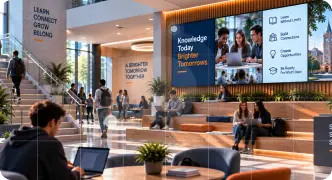
Education digital signage is a network of screens across a school or campus that shows timetables, announcements, events and emergency alerts. Staff update every screen from one dashboard, so learners, parents and visitors see accurate information without printed notices or crowded notice boards.
Paper notices pile up, go out of date and are rarely read.
Venue and timetable changes don't reach learners in time.
Alarms alone don't tell people what to do or where to go.
Sport, academic and cultural wins deserve a bigger stage.
Live timetables, exam venues and lecture changes outside every block.
Share notices from the principal or dean's office across every screen.
Override every screen instantly with clear instructions.
Promote open days, sports fixtures and celebrate learner success.
Interactive maps help new students and visitors find lecture halls and offices.
Opening hours, menus, study tips and bursary deadlines.
Durable screens, simple templates and one dashboard for every building, from a single primary school to a multi-campus university.
Talk to a specialistTamper-resistant mounts for corridors and halls.
Wayfinding, directories and visitor sign-in.
For auditoriums, foyers and student centres.
Ready-made layouts for timetables, news and events.
One click takes over every screen on campus.
Google, Microsoft 365, RSS and social feeds.
Live schedules outside every venue.
Pull today's classes, rooms and exam venues from your calendar, so screens update automatically when anything moves.
The software is free for your first screen, then R150 per screen a month on the Professional plan. A corridor screen needs only a commercial display and a media player; kiosks and video walls are quoted per campus.
Join the businesses already running their screens on Imagine. Register in minutes, or book a demo and we'll show you around.